The 5 Best Microsoft Tablets and 2-in-1s to Buy
Microsoft’s Surface lineup has long set the gold standard for Windows-powered tablets. Blending the ultra-portability of a tablet with the raw horsepower of a full desktop operating system, modern Microsoft tablets are legitimate laptop replacements.
Whether you are looking for an AI-accelerated powerhouse, a budget-conscious portable option, or an enterprise-grade machine, here are the top 5 Microsoft Surface tablets and 2-in-1s available.
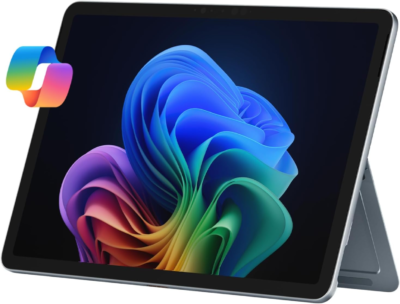
1. Microsoft Surface Pro (11th Edition)
4.5 out of 5 ratings
Best Overall Windows Tablet
Microsoft Surface Pro 2-in-1 Laptop/Tablet (2025), Windows 11 Copilot+ PC, 12″ Touchscreen Display, Snapdragon X Plus (8 Core), 16GB RAM, 512GB Storage, Ocean
The Surface Pro (11th Gen) is the definitive flagship Windows tablet. Powered by Qualcomm’s Snapdragon X Elite or X Plus processors, this generation marks a massive leap forward in performance and battery efficiency, functioning seamlessly as a Copilot+ PC.
- Key Specs: Snapdragon X Plus / X Elite chips, up to 32GB RAM, brilliant OLED or LCD display options, and Windows 11 AI integration. Microsoft
- Why We Love It: It delivers lightning-fast processing speeds, exceptional all-day battery life, and support for the Surface Slim Pen. Paired with the detachable keyboard, it effortlessly bridges the gap between tablet convenience and laptop productivity.
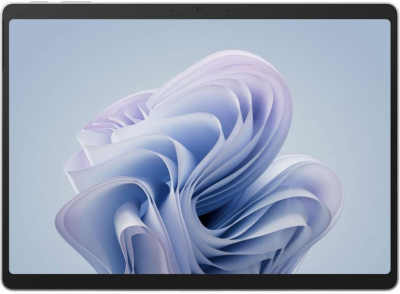
2. Microsoft Surface Pro 10 for Business
4.6 out of 5 ratings
- Best for Professionals and Enterprise Security
- Microsoft Surface Pro 10 for Business, 2-n-1 Laptop/Tablet, Windows 11 Pro, Intel Core Ultra 5, 8GB, 256GB SSD, Platinum, 5G
If you need a reliable workhorse for corporate environments, the Surface Pro 10 for Business is tailored precisely for enterprise needs. It features robust security capabilities, including NFC authentication readers and optional 5G connectivity for professionals on the move.
- Key Specs: Intel Core Ultra processors (Core Ultra 5 / 7), integrated Intel AI Boost (NPU), anti-reflective display, and enhanced webcam features.
- Why We Love It: Intel-based architecture ensures legacy software and specialized corporate apps run natively without compatibility hitches, backed by hardware-level enterprise security.
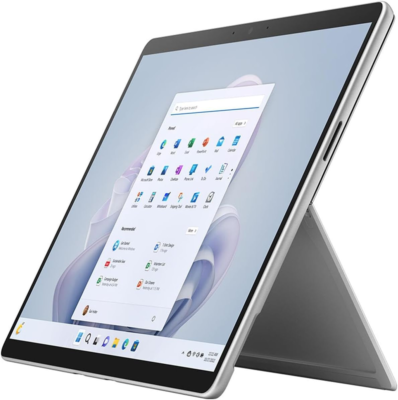
3. Microsoft Surface Pro 9 (Intel / SQ3)
4.6 out of 5 ratings
- Best Value Premium Pick
- Microsoft Surface Pro 9 Tablet – 13″ – Core i5 12th Gen i5-1245U Deca-core (10 Core) – 8 GB RAM – 128 GB SSD – Windows 11 Pro 64-bit – Platinum
With the arrival of newer generation models, the Surface Pro 9 has become an exceptional value purchase for buyers looking for flagship features without paying top-tier launch prices. Available in both Intel 12th-Gen configurations and a Microsoft SQ3 (ARM-based) 5G variant, it remains a gorgeous, sleek performer.
- Key Specs: 13-inch PixelSense display (120Hz refresh rate), Thunderbolt 4 ports (Intel version), and an aluminum chassis available in multiple colors (Platinum, Graphite, Sapphire, Forest).
- Why We Love It: It offers a premium 120Hz high-refresh display and high-end chassis design that feels just as modern as newer iterations, but at a more palatable price point.
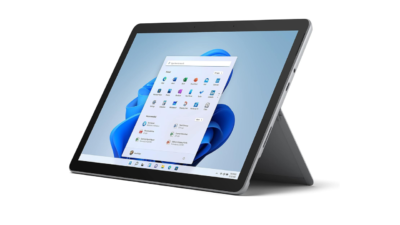
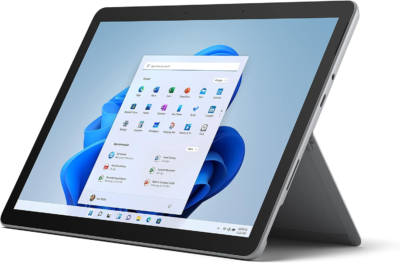
4. Microsoft Surface Go 3 for Business
4.6 out of 5 ratings
- Best Ultra-Portable & Budget-Friendly Option
- Microsoft Surface Go 3 – 10.5″ Touchscreen – Intel® Core™ i3 – 8GB Memory – 128GB SSD – Device Only – Platinum (Latest Model)
If a standard 13-inch Surface Pro feels too large or heavy, the Surface Go 4 shrinks the formula down into a highly compact, travel-friendly form factor. Built primarily with education and mobile frontline workers in mind, it is light, durable, and easy to slide into any small bag.
- Key Specs: 10.5-inch PixelSense touchscreen, Intel Processor N200, up to 8GB LPDDR5 RAM, and fanless (silent) operation.
- Why We Love It: At roughly 1.1 pounds, it’s the ultimate digital notepad and media viewer. It runs full Windows 11 Pro, making it vastly more capable for basic administrative tasks, typing, and digital ink note-taking than standard Android or budget iOS tablets.
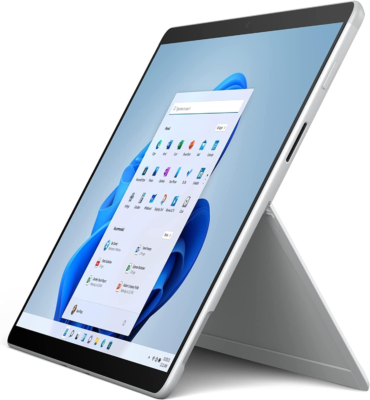
5. Microsoft Surface Pro X (SQ1 / SQ2)
4.6 out of 5 ratings
- Best Budget Entry to the Surface Ecosystem
- Microsoft 13″ Multi-Touch Surface Pro X, SQ1, 8GB RAM, 128GB SSD, PixelSense Display, Adreno 685 GPU, Bluetooth 5.0, Windows 11 Pro (Wi-Fi Only, Platinum)
As an older pioneer of Microsoft’s ARM architecture, the Surface Pro X remains a sleek, ultra-thin option frequently found on the refurbished or secondary market. Featuring razor-thin bezels and a featherlight profile, it’s a stellar choice for web-heavy workflows, typing, and media consumption.
- Key Specs: Microsoft SQ1 or SQ2 custom processor, 13-inch edge-to-edge screen (2880 x 1920), dual USB-C ports, and optional LTE connectivity.
- Why We Love It: It is arguably the sleekest-looking chassis Microsoft ever designed. For users whose daily work revolves around cloud apps, web browsing, writing, and Microsoft 365, it punches well above its weight class affordably.
Summary Comparison Table
| Model | Screen Size | Processor Type | Best Suited For |
|---|---|---|---|
| Surface Pro (11th Gen) | 13-inch | Snapdragon X Plus / Elite | Cutting-edge performance & AI features |
| Surface Pro 10 (Business) | 13-inch | Intel Core Ultra | Corporate security & legacy app compatibility |
| Surface Pro 9 | 13-inch | Intel 12th-Gen / SQ3 | Premium features at a discounted value |
| Surface Go 4 | 10.5-inch | Intel Processor N200 | Maximum portability & light office tasks |
| Surface Pro X | 13-inch | Microsoft SQ1 / SQ2 | Budget-friendly cloud work & note-taking |
FAQs About Microsoft Surface Tablets
1. Is a Microsoft Surface Pro a tablet or a laptop?
It is a 2-in-1 hybrid device.While it features a tablet form factor with a built-in kickstand and touchscreen, it runs full desktop Windows 11. When paired with a detachable Type Cover keyboard, it functions as a full-featured laptop.
2. Does the Surface Pro come with a keyboard and pen?
No.Accessories like the Surface Keyboard (Type Cover) and Surface Slim Pen are sold separately. You will need to purchase them individually or look for retailer bundles.
3. Can I upgrade the storage or RAM on a Microsoft tablet?
- Storage (SSD): Most modern Surface Pro models (Surface Pro 8 and newer) feature a removable, accessible SSD slot. However, Microsoft recommends having it replaced by a skilled technician or authorized service provider.
- RAM:No. Memory is soldered directly onto the motherboard and cannot be upgraded after purchase.
Software & Performance
4. Does Microsoft Surface run full desktop software?
Yes.Unlike iPads or Android tablets that use mobile operating systems, Surface tablets run full Windows 11. You can run desktop applications like full Microsoft 365 apps (Excel, Word), Photoshop, Chrome, and professional software.
5. What is the difference between ARM (Snapdragon) and Intel Surface models?
- Snapdragon / ARM Processors:Found in newer Copilot+ Surface Pro models.They offer all-day battery life, built-in AI acceleration (NPU), and low heat output. Most standard Windows apps run smoothly via native compilation or emulation.
- Intel Processors: Traditional x86 architecture offering maximum compatibility with older or specialized legacy Windows software and games.
6. Are Microsoft tablets good for gaming?
They are built primarily for productivity and content creation, not heavy AAA gaming. Light casual games and indie titles work well, but for demanding modern AAA titles, cloud gaming (like Xbox Cloud Gaming) is recommended.
Accessories & Usability
7. How long does the battery last?
Battery life varies depending on usage, screen brightness, and processor type:
- ARM / Copilot+ Models:Up to 12–16 hours of typical active use.
- Intel Models: Typically around 8–10 hours of active daily tasks.
8. How do I charge a Microsoft Surface tablet?
You can charge using either:
- The standard Surface Connect port with the included magnetic charger.
- Any compatible USB-C (Power Delivery) charger with sufficient wattage (typically 45W–65W or higher).
9. Which Microsoft tablet is right for me?
- Surface Go series: Compact 10.5-inch screens for basic web browsing, media consumption, and quick note-taking on a budget.
- Surface Pro series:12-inch or 13-inch displays for full laptop replacement power, heavy multitasking, digital art, and business productivity.
Related Articles
The 5 Best Microsoft Laptops for 2025
Microsoft Surface Pro 11 Price List in USA
5 Best Chargers for Microsoft Surface Pro 10